
Shinobi.pdf
Shinobi.pdf
New: version 1.1 is out

Split your PDFs.Without uploading them anywhere.

Separate chapters, invoices or single pages in seconds. Shinobi.pdf runs on your computer: fast, private and free.

Windows 10 & 11 · Free · Open source · 2 downloads · or get the portable version (.zip)

Shinobi

Tap a PDF and watch it get sliced

100%local, no internet
5ways to split
0accounts or ads
EN · ESin your language
Privacy

Your files never leave your computer.

Online tools ask you to upload contracts, invoices or notes to someone else’s server. Shinobi.pdf does everything on your PC: nothing is uploaded, nothing is stored anywhere else.

Online toolsYour file travels to someone else’s server
  1. Upload your PDF to a server
  2. Wait while it’s processed
  3. Download it again
Data you upload
40 MB
Copies on other servers
At least 1
Needs internet
Yes
File size limit
Almost always
Shinobi.pdfYour file never leaves your PC
  1. Open your PDF
  2. Split it instantly
  3. Done, no internet
Data you upload
0 MB
Copies on other servers
None
Needs internet
No
File size limit
No limit

Clean cut

One cut. Two files. Zero hassle.

Choose where to cut and Shinobi.pdf does the rest with ninja precision: no quality loss, and your bookmarks stay intact.

Hai!
Shinobi
Chapter 1.pdfChapter 2.pdf
How it works

Built to split PDFs, and do it right.

01

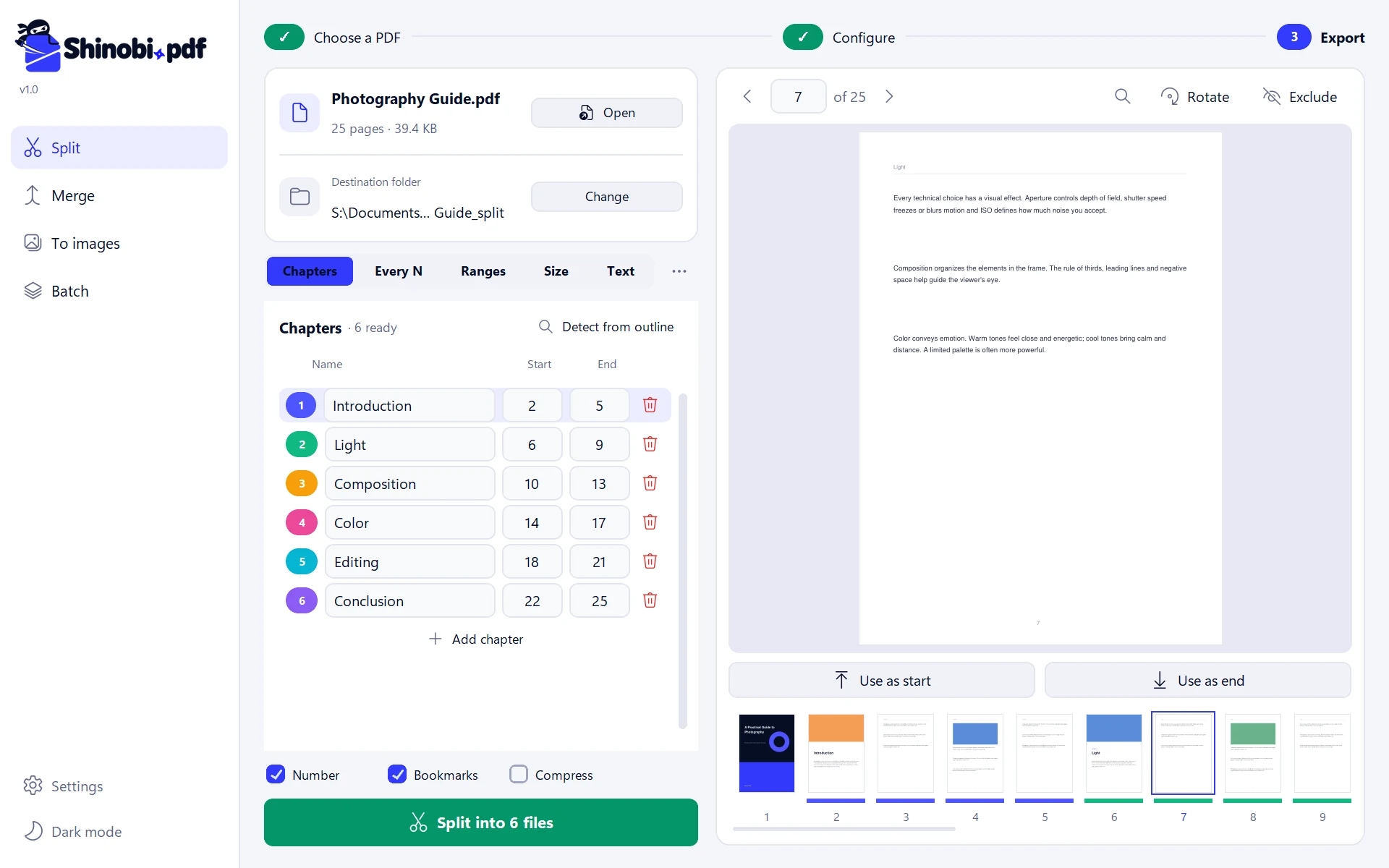
Chapters in one click

If the PDF has an outline, Shinobi.pdf detects the chapters for you. Color-coded thumbnails show which pages go into each file.

✓Choose the PDF2Configure3Export
Photography guide.pdf25 pages · 40.0 KBOpen
Destination folderS:\Documents\Photography guide_splitChange
···
Chapters
NameStartEnd
+ Add chapter

Starts a new file on every page that contains some text. Great for invoices, receipts or statements bundled in a single PDF.

Base namePart

NumberBookmarksCompress
1of 25RotateExclude
02

Split invoices by text

Type “Invoice No.” and get one file per invoice, named after its number. Perfect for statements and receipts.

✓Choose the PDF2Configure3Export
March invoices.pdf7 pages · 30.2 KBOpen
Destination folderS:\Documents\March invoices_splitChange
···
Chapters
NameStartEnd
+ Add chapter

Starts a new file on every page that contains some text. Great for invoices, receipts or statements bundled in a single PDF.

Base namePart

NumberBookmarksCompress
1of 7RotateExclude
03

Find any page

Search text inside the PDF with Ctrl+F: matches are highlighted on the page and marked on the thumbnails.

✓Choose the PDF2Configure3Export
Photography guide.pdf25 pages · 40.0 KBOpen
Destination folderS:\Documents\Photography guide_splitChange
···
Chapters
NameStartEnd
+ Add chapter

Starts a new file on every page that contains some text. Great for invoices, receipts or statements bundled in a single PDF.

Base namePart

NumberBookmarksCompress
1of 25RotateExclude
04

Merge documents

Combine several PDFs into one, in any order, with one bookmark per file in the outline.

Merge PDFs

Combine several PDFs into one. Reorder them with the arrows.

  • Signed contract.pdf3 pages · 4.0 KB
  • Technical annex.pdf4 pages · 4.0 KB
  • Budget 2026.pdf2 pages · 4.0 KB
One bookmark per fileCompress
Shinobi.pdf
✓Choose the PDF2Configure3Export
Photography guide.pdf25 pages · 40.0 KBOpen
Destination folderS:\Documents\Photography guide_splitChange
···
Chapters
NameStartEnd
+ Add chapter

Starts a new file on every page that contains some text. Great for invoices, receipts or statements bundled in a single PDF.

Base namePart

NumberBookmarksCompress
1of 25RotateExclude
✓Choose the PDF2Configure3Export
March invoices.pdf7 pages · 30.2 KBOpen
Destination folderS:\Documents\March invoices_splitChange
···
Chapters
NameStartEnd
+ Add chapter

Starts a new file on every page that contains some text. Great for invoices, receipts or statements bundled in a single PDF.

Base namePart

NumberBookmarksCompress
1of 7RotateExclude
✓Choose the PDF2Configure3Export
Photography guide.pdf25 pages · 40.0 KBOpen
Destination folderS:\Documents\Photography guide_splitChange
···
Chapters
NameStartEnd
+ Add chapter

Starts a new file on every page that contains some text. Great for invoices, receipts or statements bundled in a single PDF.

Base namePart

NumberBookmarksCompress
1of 25RotateExclude

Merge PDFs

Combine several PDFs into one. Reorder them with the arrows.

  • Signed contract.pdf3 pages · 4.0 KB
  • Technical annex.pdf4 pages · 4.0 KB
  • Budget 2026.pdf2 pages · 4.0 KB
One bookmark per fileCompress
Features

Everything you need, nothing you don’t.

Introduction · Light · Composition · ColorEvery 10 pages → 1-10 · 11-20 · 21-251-3, 7, 10-12Up to 10 MB per file, great for email“Invoice No.” → one file per invoice

Five ways to split

By chapters, every N pages, by ranges, by size or by text.

Unlocked: ready to split

Password-protected PDFs

Enter the password once and you’re set. Generated files have no password.

Opening in Shinobi.pdf…
4 itemsTry it: right-click the file

Right from File Explorer

Right-click any PDF → “Split with Shinobi.pdf”.
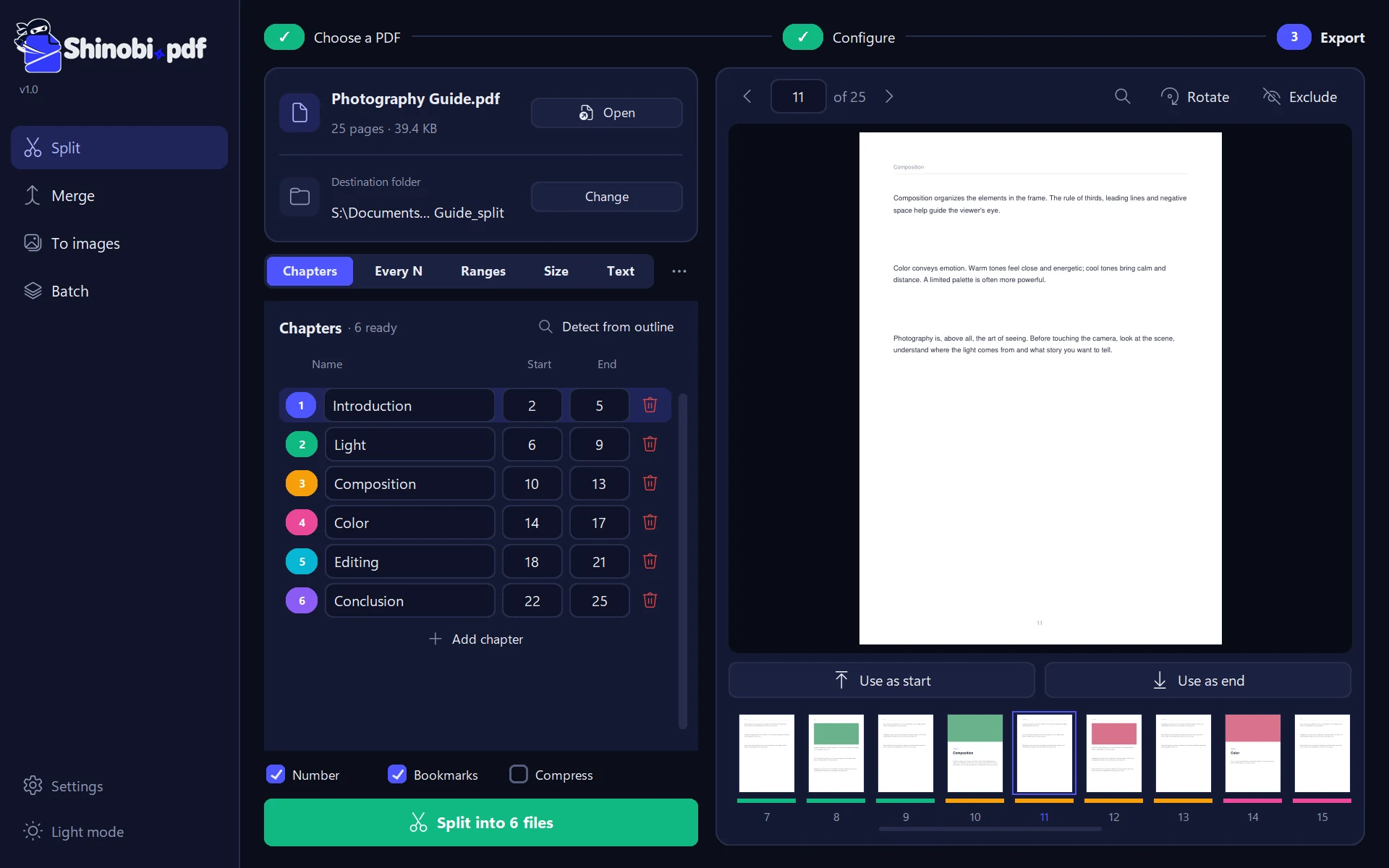
Light or dark

A modern interface that adapts to your screen, from laptops to large monitors.

Try your keyboard: ← → R X

Mark pages visually

Use “Start” and “End” while browsing pages. Rotate or exclude the ones you don’t want.

Export to images

Turn pages into PNG or JPG in three qualities.

Batch processing

Apply the same split to dozens of PDFs at once.

Templates

Save your settings and reuse them with other documents.

Fast like a ninja.

Keyboard shortcuts for everything you do often.

Try pressing (or tapping) them: they light up.

What’s new

Always getting better.

The latest additions to Shinobi.pdf, straight from GitHub.

  1. v1.1Latest version
    • Full Changelog: https://github.com/MarraTX/ShinobiPDF/compare/v1.0...v1.1
    Read the full notes
  2. v1.0
    • ShinobiPDF-Setup.exe: instalador (recomendado). No pide permisos de administrador y te deja elegir el idioma.
    • ShinobiPDF-Portable.zip: sin instalación; descomprimí y abrí Shinobi.exe.
    • Cinco formas de dividir: por capítulos, cada N páginas, por rangos (1-3, 5, 8-), por tamaño máximo (ideal para mail) o por texto, por ejemplo un archivo por cada «Factura N°».
    • Detección automática de capítulos desde el índice del PDF.
    • Visor con miniaturas de colores, búsqueda de texto (Ctrl+F), rotar y excluir páginas.
    Read the full notes

See all versions

Open source

Free, transparent and yours.

Shinobi.pdf is free software under the AGPL-3.0 license. You can read the code, suggest improvements or report problems on GitHub.

Version 1.11 stars2 downloads
FAQ

Frequently asked questions

Is it really free?

Yes. Shinobi.pdf is free, with no ads, no accounts and no paid version. It’s free software under the AGPL-3.0 license.

Are my files uploaded to the internet?

No. Everything is processed on your computer. The app only goes online to check for new versions, and you can turn that off in Settings.

Why does Windows show “Windows protected your PC”?

Because the installer isn’t digitally signed yet (that requires a paid certificate). It’s safe: the code is open source and the installer is built automatically on GitHub. Click “More info” → “Run anyway”.

Does it work offline?

Yes, completely. You can split, merge and convert PDFs without internet.

Is there a Mac or Linux version?

For now it’s Windows 10 and 11 only. If you’d like another platform, let us know on GitHub.

How do I report a problem or suggest a feature?

From the app, in Settings → “Report a problem”, or directly on GitHub. It fills in the technical details for you, with no personal data.

Shinobi

Split your first PDF in seconds.

Free, private and hassle-free.

Download Shinobi.pdf